My Experience Using Oracle Free Tier
An honest review of Oracle Cloud Free Tier after using it to host personal applications and self-hosted services for over a year.
The Beginning
It all started with a need to deploy a personal app. In early 2025, I was building Budgetify, a personal finance management app written in Laravel, and I wanted it accessible online. Since I was the only user, I didn’t need anything high-spec, just something reliable and, ideally, free.
I briefly looked at popular free platforms like Vercel, Netlify, Railway, and Cloudflare. They can run Laravel, but it takes extra configuration since those platforms are built around frontend or serverless workloads first. I wanted something simpler, so I went looking for a free VPS instead.
A bit of digging turned up a few cloud providers with free tiers, AWS, Google Cloud Platform, and Oracle Cloud among them. This post is about the one I ended up choosing: Oracle Cloud.
About Oracle Cloud Free Tier
Oracle Cloud Free Tier is popular for a simple reason: its specs are unusually generous compared to other free tiers on the market.
Oracle currently offers two flavors:
- Free Trial ($300 Credit): Free credits valid for 30 days, usable on any paid service.
- Always Free: Permanently free services with no time limit, subject to terms and conditions.
I went with Always Free, which fit my needs perfectly. Oracle lists the full set of Always Free services at oracle.com/cloud/free/, but the two I actually use are Compute (VPS Server) and Block Volume Storage.
The VPS Specs on Offer
Oracle splits its Always Free Compute offering by CPU architecture: AMD Compute Instance and Arm Compute Instance.
| AMD Compute Instance | Arm Compute Instance |
|---|---|
| 2 Micro VMs, each with 1/8 OCPU and 1 GB RAM. | A pool of 4 OCPU and 24 GB RAM total, which you can split however you like, for example: • 1 VM with 4 OCPU & 24 GB RAM, roughly equivalent to a paid VPS costing hundreds of thousands of rupiah a month. • 2 VMs, each with 2 OCPU & 12 GB RAM. |
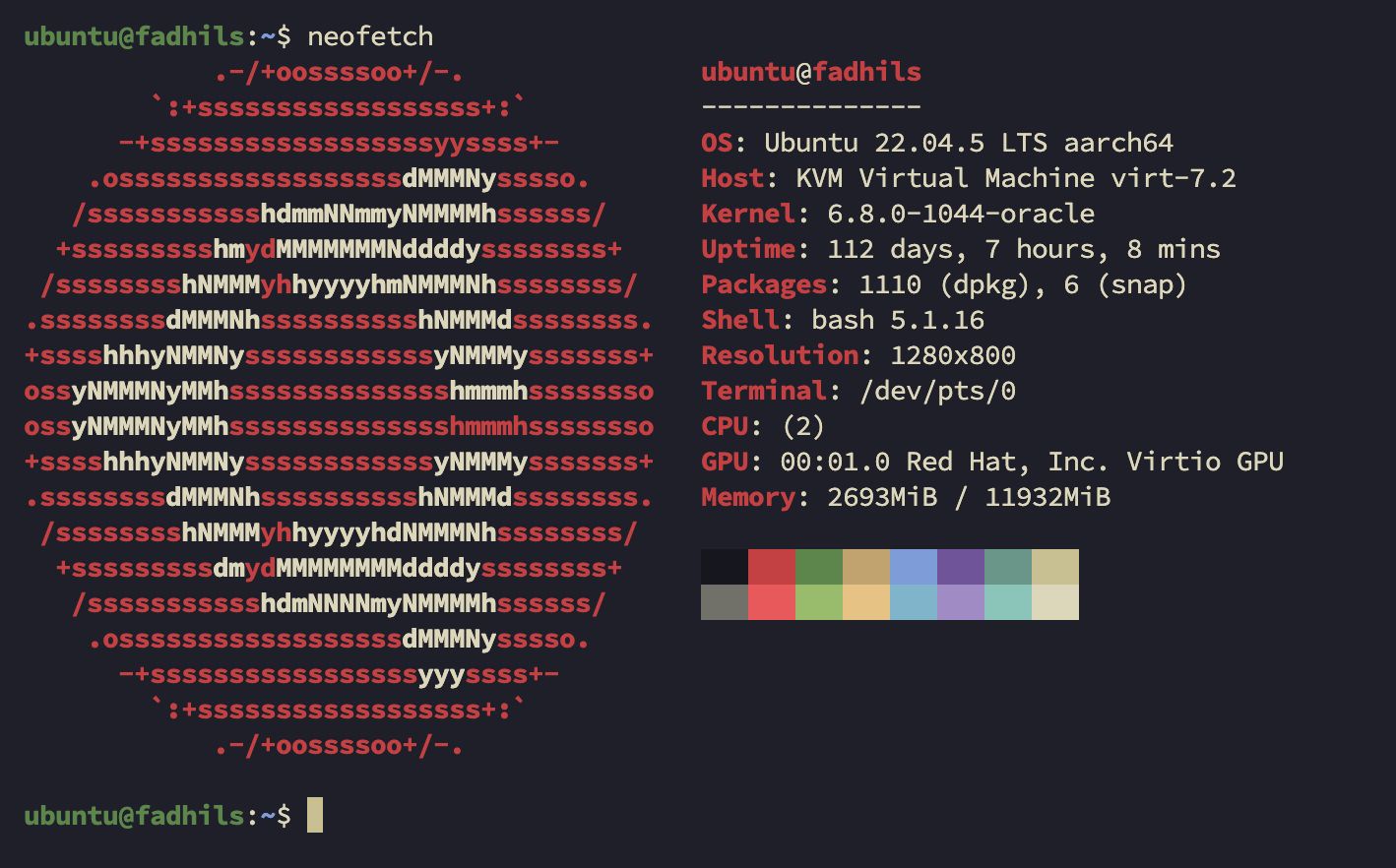
I picked the Arm Compute Instance without much hesitation. Getting 4 OCPU and 24 GB RAM for free, backed by 200GB of Block Volume Storage (SSD) you can distribute across your VMs, is hard to say no to.
The Registration Struggle
Several articles I read beforehand warned that claiming Oracle’s Always Free tier isn’t always smooth. Applications get rejected, or the capacity in your chosen region simply runs out.
My first attempt failed. I created an account fine, but the verification payment didn’t go through, since Oracle requires a linked credit or debit card for verification. On my second try, with a different email, it worked, and I spun up my first instance with 2 OCPU and 12 GB RAM in the Singapore region. No secret trick, I think I just got lucky the second time.
One thing worth keeping in mind: since a card is required during registration, make sure you have around $1 of balance available for the verification charge. It gets refunded once the verification succeeds. I used blu by BCA for mine, and it went through without any issues.
Living With the Server
Since going live, I’ve used the VPS as a hands-on lab for learning server management, alongside hosting a few personal projects and self-hosted tools like WireGuard and Bitwarden. Everything runs through Docker, currently 5 containers at once, and CPU and RAM usage still have plenty of room to spare.
I won’t go deep into benchmarks, but from when the server went live in early 2025 until today, I haven’t run into any downtime or server issues, aside from a single 20-minute maintenance window, which is completely normal.
The one real downside has been software compatibility. ARM servers run on arm64 (aarch64) architecture instead of the x86_64 found in typical Intel/AMD processors. Older packages, certain libraries, or legacy Docker images not built for ARM simply won’t run, or will throw errors. You have to confirm that whatever software or image you’re installing supports arm64/v8. The good news is that most modern frameworks, Laravel, Node.js, Python, and the popular databases, already support ARM without any fuss.
Is It Really Always Free?
According to Oracle’s own documentation, yes, it’s free forever, no surprise bills, as long as you stay within their rules. In practice, though, there are a few footnotes that make “Always Free” feel a bit more conditional than it sounds. Your bill stays at $0 as long as you don’t exceed the free quota, so keeping your specs within that limit is what actually keeps it free.
But access isn’t the same as ownership. Oracle still owns 100% of the hardware you’re using, free or not. There’s no such thing as a free lunch, and this is no exception.
A quick look through forums like Reddit turns up plenty of people whose Always Free accounts got terminated out of nowhere. It usually comes down to two things:
- Idle Account Reclamation Policy: Oracle periodically reclaims idle free servers to free up hardware. If your VM sits below 15% CPU and RAM utilization for 7 consecutive days straight, Oracle can stop or reclaim it.
- Fraud or Abuse: Oracle’s fraud detection is sensitive. Any activity flagged as suspicious can get an account banned without warning.
So it pays to follow their Terms and Conditions closely, and to remember that the policies themselves can shift at any time.
Final Thoughts
Oracle Cloud’s Free Tier stands out for being genuinely generous compared to the competition. It’s more than enough for anyone learning server management, or just looking for a low-cost home for a personal portfolio.
Oracle isn’t lying about the “free forever” part either, it’s simply a smart way to get developers comfortable inside their ecosystem early. As long as you register with real information, use the server normally, and give it just enough workload that it doesn’t look abandoned, your account should be fine.